
Zero to Hero: Tracking Real Enquiries & Turning GA4 Data Into More Sales

To turn standard Google Analytics 4 into a revenue-tracking engine, move beyond basic pageviews in three stages: first, track all direct contact actions including mobile phone taps, WhatsApp chats, and validated forms; second, pass lead type and estimated value via the DataLayer for Enhanced Conversions; third, build GA4 funnel explorations to spot and fix form drop-off friction.

Craig Hall - Senior Web Developer & Conversion Strategist
By Craig Hall • Senior Developer & Conversion Strategist
Zero to Hero: Tracking Real Enquiries & Turning GA4 Data Into More Sales
PPH Plumbing • Phone, WhatsApp & Boiler Lead Attribution Service Hub: Website Tracking & Attribution Pillar ↗
The Problem We Are Solving

Your analytics counts "pageviews" and generic form hits, but you have no idea who tapped your phone number, opened WhatsApp, or abandoned your quote form halfway through.

The Outcome: A 3-stage revenue tracking system that captures every call, WhatsApp chat, and high-value quote—and shows you the exact website tweaks needed to win more enquiries.

Real Client Build • 3-Stage Progression

How Our GTM Setup Scales Across 3 Stages

A simple visual look inside Google Tag Manager showing how tracking evolves from basic contact clicks (4 tags) to lead values (6 tags) and form drop-off tracking (8 tags).

Live Client Example • PPH Plumbing
Note: This is a simplified example to show tag progression. Real setups also include your cookie banner settings and site-specific form rules.
STAGE 1 WORKSPACE • 4 CORE ENQUIRY TAGS Example Workspace • Handcrafted in GTM
Clean Foundation & Basic Enquiries
What This Stage Unlocks for Your Business 4 Tags Active in Container

Most business websites only count pageviews. Our Stage 1 baseline wires up a clean Google Tag (Consent Mode v2 ready) alongside dedicated link-click triggers for mobile phone taps (tel:), WhatsApp chats (wa.me), and email clicks (mailto:) so every real enquiry is counted.

GA4 - 00 - Google Tag (Base Config + Consent Mode v2)GA4 - 01 - Phone Call Tap (click_phone)GA4 - 01 - WhatsApp Chat Start (click_whatsapp)GA4 - 01 - Email Click (click_email)
Step 01 of 04
STAGE 1 • 4 CORE TAGS

Stage 1: Catch Every Real Enquiry (Phone Taps, WhatsApp & Email)

If you run a trade, garage, or local service business, over half your best customers never fill in a contact form—they tap your phone number on mobile or open a WhatsApp chat. In Stage 1, we deploy a clean 4-tag GTM foundation covering your base Google Tag plus dedicated link-click triggers for tel:, wa.me, and mailto: [1].
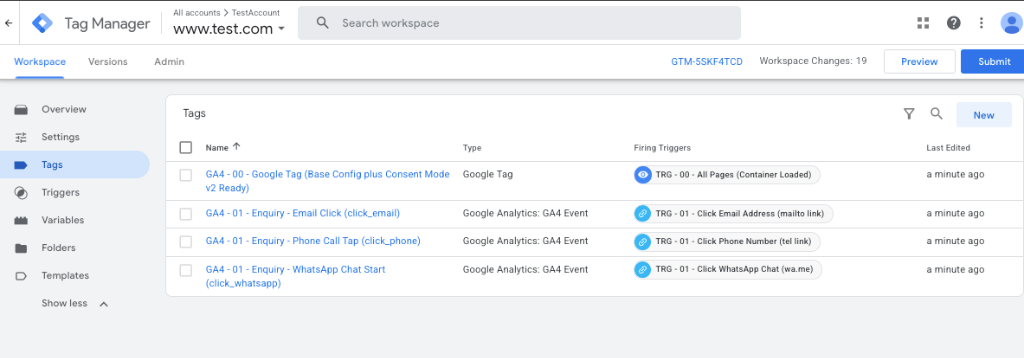
GTM Workspace • Stage 1: Basic Enquiries (4 Tags)
Stage 1 GTM Workspace (4 Tags): Base Google Tag + Email, Phone Call Tap (click_phone), and WhatsApp Chat (click_whatsapp) triggers.

Stage 1 GTM Workspace (4 Tags): Base Google Tag + Email, Phone Call Tap (click_phone), and WhatsApp Chat (click_whatsapp) triggers.

GA4 - 00 - Google Tag (Base Config + Consent Mode v2 Ready)GA4 - 01 - Enquiry - Email Click (click_email)GA4 - 01 - Enquiry - Phone Call Tap (click_phone)GA4 - 01 - Enquiry - WhatsApp Chat Start (click_whatsapp)
01
Trigger 1: Click URL starts with tel:

Fires event click_phone with parameters phone_number and page_path so you know which service page drove the call.

02
Trigger 2: Click URL contains wa.me

Captures high-intent mobile WhatsApp enquiries that standard analytics completely ignores.

03
Trigger 3: Click URL starts with mailto:

Tracks direct email link taps alongside your baseline Consent Mode v2 Google Tag.

Why this matters: Without tel: and WhatsApp tracking, a Google Maps or Local SEO page that generates 15 phone calls a week looks like it has a 0% conversion rate in your reports.
Step 02 of 04
STAGE 2 • 6 TAGS (+2 ADDED)

Stage 2: Track Lead Quality & Job Value via DataLayer (Gold vs. Noise)

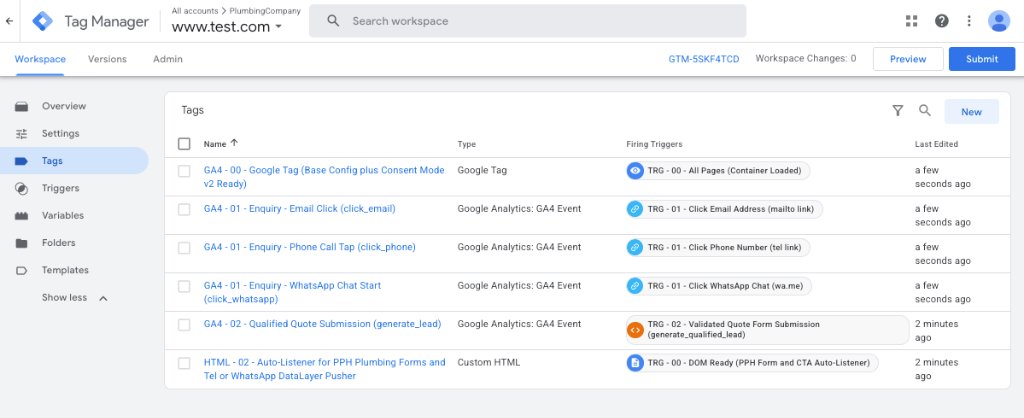
Once every call and click is counted, Stage 2 expands your container from 4 tags to 6 tags by adding an automated Form DataLayer Listener and a Qualified Lead GA4 tag. When a visitor submits a quote form, it inspects the selected service tier (e.g., £4,500 Full Installation vs. £120 Repair) and pushes the estimated £ job value straight into GA4 [2].

GTM Workspace • Stage 2: Lead Quality & Value DataLayer (6 Tags)
Stage 2 GTM Workspace (6 Tags): Adds GA4 - 02 Qualified Quote Submission (generate_lead) and HTML - 02 Auto-Listener DataLayer Pusher.

Stage 2 GTM Workspace (6 Tags): Adds GA4 - 02 Qualified Quote Submission (generate_lead) and HTML - 02 Auto-Listener DataLayer Pusher.

+ GA4 - 02 - Qualified Quote Submission (generate_lead)+ HTML - 02 - Auto-Listener for Forms & Tel/WhatsApp DataLayer Pusher
01
Parameter: lead_type, service_area & estimated_job_value

Maps each form enquiry to a real £ value via a GTM Lookup Table so GA4 reports actual pipeline revenue by channel [1].

02
Validated Form Listener (Zero False Positives)

Only fires generate_qualified_lead after required fields validate—never on failed button clicks [2].

Why this matters: When Google Ads or your SEO reports know the difference between a £120 tyre-kicker and a £4,500 installation enquiry, you stop wasting budget on channels that only bring low-margin jobs.

Step 03 of 04
STAGE 3 • ALL 8 TAGS (+2 ADDED)

Stage 3: Watch Where Visitors Hesitate (Form Step Drop-Off & 75% Scroll)

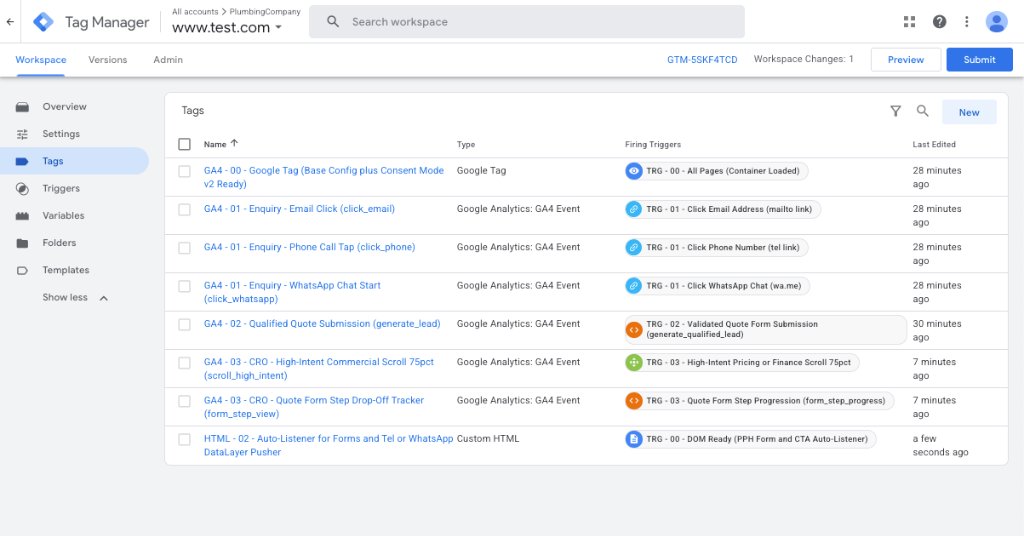
Stage 3 completes the 8-tag agency container by adding behavioural CRO telemetry: tracking multi-step quote form progression (form_step_view) and 75% vertical scroll depth on high-intent pricing and service pages (scroll_high_intent).

GTM Workspace • Stage 3: Full Behavioural CRO & Funnel Telemetry (8 Tags)
Stage 3 Complete GTM Workspace (All 8 Tags): Adds GA4 - 03 Quote Form Step Drop-Off Tracker (form_step_view) & 75% High-Intent Commercial Scroll.

Stage 3 Complete GTM Workspace (All 8 Tags): Adds GA4 - 03 Quote Form Step Drop-Off Tracker (form_step_view) & 75% High-Intent Commercial Scroll.

+ GA4 - 03 - CRO - High-Intent Commercial Scroll 75pct (scroll_high_intent)+ GA4 - 03 - CRO - Quote Form Step Drop-Off Tracker (form_step_view)
01
Step 1 → Step 2: 64% Abandonment Detected

Funnel exploration reveals mobile users quitting when asked for mandatory full street address or photo uploads on step 2.

02
The CRO Fix: Cut 7 Fields Down to 3

Removing unnecessary fields and adding 1-tap phone/WhatsApp options lifted completed enquiries from 2.1% to 5.4%.

Why this matters: If 200 people complete Step 1 of your quote form (`form_step_view`) but only 18 submit (`generate_lead`), your traffic isn’t the problem—Step 2 of your form is leaking money.

Step 04 of 04

Stage 4: Turn Your Numbers Into Practical Website Fixes (CRO)

Once a month, open your GA4 Exploration reports and check three things: (1) Which channel brings the highest rate of qualified leads, (2) Which service page has high traffic but low enquiry clicks, and (3) How your mobile conversion rate compares to desktop [3].

Channel Attribution • Traffic vs. Paying Jobs
01
Local SEO & Maps: 6.8% Qualified Lead Rate

Fewer raw sessions than broad social ads, but 3.4x more high-value installation enquiries.

02
Mobile Viewport Friction Check

Fixing a 3.8s mobile LCP delay and sticky CTA overlap recovered 28% of lost mobile checkouts [3].

Why this matters: Data sitting in a dashboard makes £0. Using that data to move your phone number into a sticky mobile bar, simplify a leaky form, or speed up a slow Shopify checkout turns existing traffic into immediate revenue.

Common Questions & Quick Answers

Yes. Whenever a visitor taps your phone number (tel: link) or opens a WhatsApp chat on your website, Google Tag Manager captures that exact click, records which page they were looking at, and attributes it back to the Google search, map listing, or ad that brought them to your site.
TURN YOUR TRAFFIC INTO PAYING JOBS • £97 Fixed • Zero Lock-In

Want Craig to Audit Your Tracking & Build a High-Converting Prototype in 48 Hours?

Don’t guess where your website is leaking enquiries. For a one-time £97 kickoff, I will inspect your GA4/GTM setup, map your conversion drop-offs, and code a live Tailwind prototype of your highest-impact page.